Graphics Primitives
NOTE: The responses to some of the questions are similar to those
presented on Casey's web page, since we answered them together.
Part 1: The Graphics Environment
At the top level, the graphics environment consists one or more Graphics
Context structures, much like X-Windows. This structure contains the
current pen color, the current fill color, and a pointer to an
Image_t object. Within the Image_t object, there are long integers
representing the height and width of the image, a pointer to an array
of Pixels the size of heightxwidth, and a long integer representing the
number of colors in the image (usually 255). Other structures in the
environment include a Point_t structure containing two long integers
that represent the row and column of the desired point, and a Color_t
structure that is, in essence, a Pixel.
There are several simple methods included in the graphics environment.
The first is a constructor method that creates and initializes a new
Graphics Context. The constructor takes in the desired height and width
of the image within the Graphics Context. Sufficient memory is
allocated for an image of size widthxheight, the width and height are
set, the pen color is initialized to black, and the fill color is
initialized to white. This method should be a clue that we are leaning
toward object oriented programming and will probably port our code
over to C++.
Another useful method in the Graphics Environment is SetPixel. This
simply takes a row, column and Graphics Context as inputs and plots the
pixel at (col, row) with the current pen color. Bounds checking is
performed within this function. SetFillPixel, a variation of SetPixel,
plots the pixel at (col, row) with the current fill color.
Other methods include:
- Dump: Frees the memory that was allocated for the current Graphics
Context.
- FillImage: Writes over the entire image with the specified color.
- SetPenColor: Sets the current pen color
- SetFillColor: Sets the current fill color
- SetNumColors: Sets the number of colors in the image for writing
PPM images
Finally, the GraphicsIncludes.h file contains a list of the libraries
necessary for the graphics system. This list will be expanded as more
libraries are added.
Part 2: Bresenham's Line-drawing Algorithm
The algorithm selected to draw lines in the graphics environment was
Bresenham's Integer Algorithm, as outlined in Rogers. The algorithm was
adjusted to use a coordinate system centered in the lower left-hand
corner of a pixel rather than in the center. The drawLine function also
includes special cases for horizontal and vertical lines to take into
account the peculiarities that arise when drawing polygons. These
special cases will draw the polygons counterclockwise. The speed of
drawLine was clocked on a 440 MHz Sun Ultra 10 from the Sun lab and was
found to be about 19000 lines per second. The average line length was
103.9.

As an extension, we added a drawDashedLine function to draw a dashed line.
This function takes in the frequency with which a pixel should be
skipped, along with the arguments for drawLine, and draws the line
accordingly. An algorithm to speed up the line drawing process was also
implemented. The algorithm consists of drawing the line from both ends
at once, using the values at one end to create the other end. An increase
to 21000 lines per second was experienced. This was surprisingly less
than the 38000 lines per second expected.

Part 3: The Midpoint Circle and Ellipse Algorithms
The circle algorithm selected for this task is related to the
Bresenham line algorithm. Details of both the circle and ellipse
creation algorithms can be found in Rogers. The circle algorithm
only needs to be calculated in one octant, since a circle is perfectly
symmetric. The circle is calculated in the sixth octant to adjust for
the coordinate system shift. Likewise, the ellipse is calculated in the
third quadrant.
Part 4: Image of a Box on a Table
This is an image of a box on a table. There isn't much more to say.
It will probably be cooler after the next lab.

Questions
1. Who did you work with on this assignment, and what tasks did each
of you do?
I worked with Casey Smith. We both worked on all of the tasks.
2. Describe your graphics environment. Include the following
information in your answer:
Our graphics environment resembles X-Windows. To begin, the user creates a
graphics context, which is a structure containing all of the variables
necessary to create an image and the figures within it. In order to add
primitives to the graphics context, the user calls a function which takes
as arguments primitive-specific parameters (location, radius, etc) and a
graphics context. It then uses the state variables from the graphics
context (color, image array, etc) to draw the primitive. The graphics
context is passed to each of these functions.
- What state variables do you have?
The Graphics Context contains:
- the pen color
- the fill color
- a pointer to an image, which contains:
- the number of rows
- the number of columns
- the number of colors
- an array of Pixels
- How are you representing these variables?
The variables are stored in structures. At the simplest level, there
is a Color_t type that is simply a Pixel, and a Point_t type that
contains two long integer values, one for the point's row and the
other for the point's column. At the next level, the Image_t
structure has a pointer to a Pixel array, and three longs: rows,
columns, colors. Finally, GC structure has two variables of type
Color_t to represent the pen and fill colors and a pointer to a
variable of type Image_t.
- How do the graphics routines access the state variables?
The Graphics Environment contains a constructor function that takes as
arguments the width and height of the image. The constructor sets the
width and height of the image within the new graphics context to these
values, and sets defaults for all the others as described above
(see Part 1). There are accessor methods (much in the style of object
oriented programming) for changing pen color, fill color, and
numcolors.
3. Is your first required image consistent with how you match screen
coordinates to the true mathematical lines? Why, why not?
Yes. In adjusting lines to match a coordinate system centered in the lower
left-hand corner of the pixel, rather than the center of the pixel, we
made our lines match true mathematical lines. All lines are drawn in the
first or second quadrant, don't draw the last pixel, and move the starting
point if the line is in the second quadrant to start on the correct side of
the coordinate axis.
4. If you extended this assignment in any way, describe what you did
and how you did it. Include pictures to support your description.
- Dashed Lines:
We created a drawDashedLine function to produce dashed lines. The user
specifies a "skip" value. The function draws the line, skipping every "skip"th pixel.
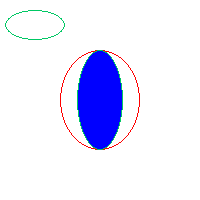
- Filled Circles and Ellipses:
Alternative circle and ellipse drawing methods were created to draw filled
circles and ellipses given the current pen and fill colors.
- Sped Up Line:
We used line symmetry to speed up the line. Starting at the beginning
point, we used Bresenham's algorithm to calculate successive points on the
line. As we filled in from the starting point, we also filled
in from the ending point because lines are rotationally symmetric about their
midpoints. This didn't speed up the line drawing as dramatically as was
expected. We saw an increase from 19000 lines per second to 21000 lines per
second on Mustard. The reason this isn't a larger increase is that in order
to calculate the symmetry, more variables and more calculations must be
added to the function.
- Sped Up Circles and Ellipses : We made use of the fact that all parts
of the circle can be obtained by symmetry from the first octant, and we only
drew one octant in order to paint all pixels. Similarly, it was only
necessary to draw the ellises in the third quadrant and then reflect these
points over the coordinate axes.